
Please note: this part is technical (for advanced users only) which describes how you can use our app’s API to perform some automation (for example – activate Smart STB apps on your portal in the background so they start in your Portal right after they have entered the code for activation) and must be done by a qualified person. We can not provide you with technical support, nor install this code for you.
Getting a code and some device info
Here are some examples on how to use API version 2 for IPTV and OTT Providers (who have full access to their Portal and can access the Portal’s API backend).
Dear classic resellers, please do not use the Provider API.
You have a different API which will be enabled for everyone in few days.
For local/limited networks/regions:
Regional providers which operate in limited area will have all app users inside the provider’s IP range redirected to their portal. Provider must proof they own this range with the regional IP registry.
For LAN ranges or limited VLAN’s and other tunnels a DP in the local area network will be required for proper operation.
A good practice for limited area networks is to track your users by their local IP’s inside your own network, they will appear in your portal automatically on the first app start.
All other providers who operate in many regions must use code activation to assign clients to their portals.
Before you start: make sure you know your Token and your personal API URL endpoint. You can find them in your subscriptions here (make sure you login if you have not already)
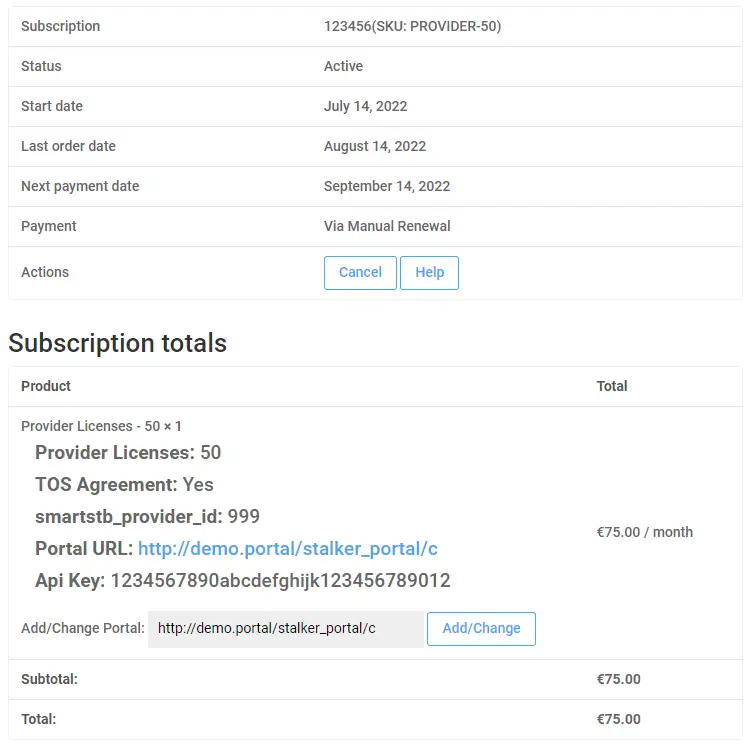
Step 1: you need to request a new code to provide to your user:
https://api.smart-stb.tv/call?action=newcode&token=3399cc882288aaffbbccddaaff11afaf(code is example, it will not work unless you change the token to your own)
Example response:
{"code":"1234567890"}Then, check the code periodically, for example 3 seconds (each code is valid 10 minutes):
https://api.smart-stb.tv/call?action=status&code=1234567890&token=3399cc882288aaffbbccddaaff11afaf&p_note=Your%20Note%20HereThe parameter p_note for adding your own note is optional.
Response when code is used by a client:
{"vendor":"LG (WebOS)","model":"WEBOS 4.0","vmac":"00:1A:79:79:80:81","mac":"f1:f2:d3:79:80:81"}Please make sure to use vmac for your IPTV Portal and store mac for later use if you want to remove this client via the API in the future.
If the code is not used (or like old API, there is other error), you will get this:
{"result":-1}After client was successfully activated – they need to visit the Embedded Portal to start your Portal.
We strongly advise you to store the Software ID of the app in your Portal, for example in the comment section as part of the Description field so you can automate the deletion process later.
You can not delete an user by deleting the activation code.
Adding and deleting by Software ID:
To add or delete an app ID, please use the old commands from API version 1:
For adding:
https://api.smart-stb.tv/call?action=add&mac=f1f2d3798081&token=3399cc882288aaffbbccddaaff11afaf&p_note=Your%20Note%20HereThe parameter p_note for addaing your own note is optional.
For deleting:
https://api.smart-stb.tv/call?action=delete&mac=f1f2d3798081&token=3399cc882288aaffbbccddaaff11afafGetting information for a Software ID:
To get information about an app ID, please use the macinfo command:
https://api.smart-stb.tv/call?action=macinfo&mac=f1f2d3798081&token=3399cc882288aaffbbccddaaff11afafExample response:
{"result":0,"msg":"Device Exists.", "macinfo":{"mac":"F1:F2:D3:79:80:81","model":"Prototype (Native)","vendor":"Android+","vmac":"00:1A:79:79:80:81"}}Integration with Portal
Here are some examples how you can add your clients in some popular middleware platforms. Contact the middleware vendor for support and more information.
1. Make sure you locate your custom.ini file where you will need to enable API (if not enabled already). Example of enabled API with username of apiuser and password of 12345678
[server_api]
; API required for tv archive, pvr and billing
enable_api = true

; For security reasons it is highly recommended to use HTTP authentication
api_auth_login = apiuser
api_auth_password = 12345678
2. Get a code from our API to show the client
Example Request:
https://api.smart-stb.tv/call?action=status&code=1234567890&token=3399cc882288aaffbbccddaaff11afafExample Response:
{"vendor":"LG (WebOS)","model":"WEBOS 4.0","vmac":"00:1A:79:79:80:81","mac":"f1:f2:d3:79:80:81"}3. Get the Virtual MAC, in this example 00:1A:79:79:80:81 and add it to your Portal, here is an php example.
<?php

$user = "apiuser";
$pass = "12345678";

$auth = base64_encode($user . ":" . $pass);

$curl = curl_init();
$url = "http://your_portal_url/stalker_portal/api/accounts/00:1A:79:79:80:81";

curl_setopt($curl, CURLOPT_HTTPHEADER, array("Authorization: Basic $auth",
                                              "Content-Type: application/json"));
   curl_setopt($curl, CURLOPT_CUSTOMREQUEST, "POST");
            $post = [
                'mac' => "00:1A:79:79:80:81",
            ];
   curl_setopt($curl, CURLOPT_POSTFIELDS, http_build_query($post));
   curl_setopt($curl, CURLOPT_URL, $url . '' . $action);
   curl_setopt($curl, CURLOPT_RETURNTRANSFER, 1);
   curl_setopt($curl, CURLOPT_HTTPAUTH, CURLAUTH_BASIC);
   // EXECUTE:
   $result = curl_exec($curl);

?>
4. Do not forget to Assign a Tariff Plan to 00:1A:79:79:80:81 so the Smart-STB user can access the channels (according to their plan).
<?php

$user = "apiuser";
$pass = "12345678";

$auth = base64_encode($user . ":" . $pass);
$curl = curl_init();
$url = "http://your_portal_url/stalker_portal/api/accounts/00:1A:79:79:80:81";

curl_setopt($curl, CURLOPT_HTTPHEADER, array("Authorization: Basic $auth",
                                              "Content-Type: application/json"));
   curl_setopt($curl, CURLOPT_CUSTOMREQUEST, "PUT");
            $post = [
                'tariff_plan'   => 'FULL', //make sure you take your tariff plan's ID (not the full name) and replace FULL with your own name of the tariff plan you want to set
                'comment'   => 'some description goes here...',
                'status'   => '1' //this means it's activated, otherwise Smart STB will get "STB Blocked" error message.

            ];
   curl_setopt($curl, CURLOPT_POSTFIELDS, http_build_query($post));
   curl_setopt($curl, CURLOPT_URL, $url . '' . $action);
   curl_setopt($curl, CURLOPT_RETURNTRANSFER, 1);
   curl_setopt($curl, CURLOPT_HTTPAUTH, CURLAUTH_BASIC);
   // EXECUTE:
   $result = curl_exec($curl);

?>
Please do not forget to store the Software ID of your APP for example in the comment section as part of the description.
This page is for registered providers only.